5 best gaming controllers for PC, Xbox, and PlayStation in 2025

Ready to upgrade your gaming experience? Here are the five best gaming controllers for 2025: Xbox Wireless Controller, Xbox Elite Wireless Controller Series 2, Razer Wolverine Ultimate, Hyperkin The Competitor Controller, and GameSir Nova Lite. Check out this table for a quick look at what makes each controller stand out:
| Controller Name | Unique Feature |
|---|---|
| Xbox Wireless Controller | Modern design, hybrid D-pad, and share button |
| Xbox Elite Wireless Controller Series 2 | Pro-level customization and paddles |
| Razer Wolverine Ultimate | Fast response and advanced remapping |
| Hyperkin The Competitor Controller | Retro style with modern compatibility |
| GameSir Nova Lite | Affordable price with solid performance |
You should think about your platform, play style, and budget before picking the best gaming controller for your setup.
Key Takeaways
- Choose a gaming controller that fits your platform, play style, and budget for the best experience.
- The Xbox Wireless Controller offers comfort, a solid build, and wide compatibility at a fair price.
- For premium customization and long battery life, the Xbox Elite Wireless Controller Series 2 is ideal.
- The Razer Wolverine Ultimate excels in speed, precision, and advanced customization for competitive play.
- GameSir Nova Lite provides great value with broad device support, perfect for budget and multi-platform gamers.
1. Xbox Wireless Controller
Features
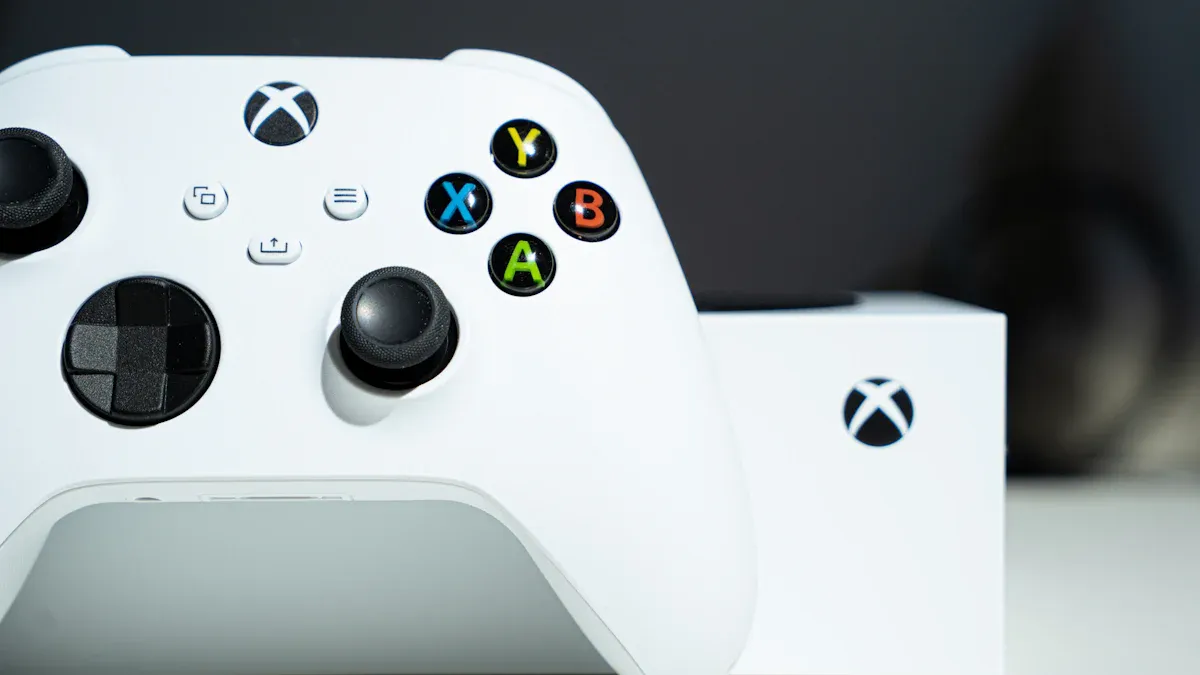
You get a modern design with the Xbox Wireless Controller. The hybrid D-pad feels smooth and helps you pull off quick moves in any game. The textured grip keeps your hands steady, even during long gaming sessions. The share button lets you capture and share your best moments with just one tap. You can use this controller wirelessly or plug it in with a USB-C cable. The battery life lasts for hours, so you can play without worrying about charging all the time.
Pros & Cons
Here’s a quick look at what users and editors say about the Xbox Wireless Controller:
| Pros | Cons |
|---|---|
| Competitive price | A stiff D-pad can feel uncomfortable for fast inputs |
| Superb comfort for long sessions | Rubber thumbstick covers may wear out over time |
| Precise, grippy thumbsticks | Not compatible with PS5 or Nintendo Switch |
| Trigger rumble adds to the experience | |
| Excellent battery life | |
| Good compatibility with Xbox, PC, Android, and iOS |
Many gamers love the comfort and price. Some mention the D-pad feels stiff, especially if you play fighting games. The thumbstick covers might wear out after heavy use, but most users find the controller reliable for everyday gaming.
Compatibility
You can use the Xbox Wireless Controller with Xbox Series X|S, Xbox One, and Windows PCs. It also works with Android and iOS devices, making it a great controller for pc gaming and mobile play. Some users report issues when connecting to a PC. Sometimes, the controller blinks but does not show up in the Bluetooth list or Device Manager. If this happens, try updating drivers, clearing the Bluetooth cache, or using the Xbox Accessories app for firmware updates. If nothing works, the controller might have a hardware problem. Most of the time, though, you will find it easy to connect and start playing.
Why Best Gaming Controller
If you want the best controller for pc or Xbox, the xbox wireless controller stands out. It blends comfort, solid build quality, and a fair price. You get a controller for Xbox and pc that feels great in your hands and works with many devices. The hybrid D-pad and share button add modern touches. For most gamers, this is the best gaming controller for everyday use. You can trust it for both casual and competitive play, making it a top pick as the best controller for pc in 2025.
2. Xbox Elite Wireless Controller Series 2
Features
If you want a controller that feels like it was built just for you, the Xbox Elite Wireless Controller Series 2 stands out. You get a ton of premium features and customization options. Here’s a quick look at what you can expect:
| Feature Category | Details |
|---|---|
| Adjustable Thumbsticks | Adjustable-tension thumbsticks with 3 tension settings and interchangeable thumbstick toppers |
| Trigger Mechanism | Shorter hair trigger locks for faster firing |
| Grip | Wrap-around rubberized grip for enhanced comfort and control |
| Battery | Internal rechargeable battery with up to 40 hours of life per charge |
| Customization Components | Interchangeable thumbstick toppers, D-pads, and paddles included |
| Button Mapping | Custom button mapping via Xbox Accessories app; save up to 3 custom profiles + 1 default |
| Profile Switching | On-the-fly switching between profiles using the Profile button |
| Device Compatibility | Pair and switch between Xbox Series X |
| Included Accessories | Charging dock, USB-C cable, 4 paddles (medium and mini), additional thumbsticks, standard D-pad, carrying case |
| Additional Features | Impulse Triggers with adjustable motor control, 3.5mm stereo headset jack, compatibility with Xbox One accessories |
You can swap out thumbsticks, D-pads, and paddles to match your play style. The controller even comes with a carrying case and charging dock, so you stay organized and ready for action.
Pros & Cons
Let’s break down what gamers and editors love—and what they wish was better—about the Xbox Elite Wireless Controller Series 2:
| Pros | Cons |
|---|---|
| Pro-level customization and swappable parts | High price point |
| Adjustable-tension thumbsticks and hair-trigger locks | Heavier than standard controllers |
| Up to 40 hours of battery life | Some users report stick drift over time |
| Save and switch between multiple profiles | |
| Premium build and comfortable grip | |
| Works with Xbox, PC, and mobile devices |
You get a controller that feels solid and fits your hands well. Some users mention the price is steep, but many say the features make it worth it.
Compatibility
You can use the Xbox Elite Wireless Controller Series 2 with Xbox Series X|S, Xbox One, Windows PCs, and even mobile devices. It connects through Xbox Wireless, Bluetooth, or USB-C. You can switch between devices quickly, which makes it a great pick if you play on more than one platform. The Xbox Elite Series 2 core controller offers similar compatibility, so you have options if you want something a bit different.
Best Premium Controller
If you play competitively or just want the best premium controller, this one checks all the boxes. You get adjustable-tension thumbsticks, shorter hair trigger locks, and the ability to save up to three custom profiles. You can even assign buttons as "Shift" keys for complex combos. The wrap-around grip and long battery life mean you can play for hours without discomfort. Many pro gamers call it the best customizable controller for 2025. The Xbox Elite Wireless Controller Series 2 and the Xbox Elite Series 2 core controller both deliver top-tier performance, but the Series 2 stands out for its extra features and accessories. If you want to level up your game, this is the best premium controller you can buy.
3. Razer Wolverine Ultimate

Features
If you want a controller that feels fast and precise, the Razer Wolverine Ultimate stands out. You get Mecha-Tactile Action Buttons that click with every press, so you never miss a move. The rubberized grips feel comfortable, even during long gaming sessions. You can customize almost everything using Razer Synapse software. You can remap buttons, adjust thumbstick sensitivity, and save over 500 profiles. The controller includes multi-function back buttons, trigger stops for quicker shots, and immersive Razer Chroma RGB lighting. The battery lasts up to 20 hours, so you can play all day without stopping.
Tip: The Razer Wolverine V3 Pro offers hall effect joysticks for a premium feel and supports a 1000 Hz polling rate in PC tournament mode. This means you get top-tier speed and accuracy.
Pros & Cons
Here’s what gamers and editors say about the Razer Wolverine Ultimate:
| Pros | Cons |
|---|---|
| Super low input latency and fast response | Slightly higher price than standard |
| No inner dead zone for precise stick control | Wired mode is preferred for the best speed |
| Ergonomic design and comfortable grips | |
| Extensive customization and remapping options | |
| Multi-function back buttons for advanced combos | |
| Outstanding build quality | |
| Razer Chroma RGB lighting | |
| Long battery life |
You get a controller that feels great in your hands and responds instantly. Pro gamers love the mechanical buttons and the ability to tweak every setting.
Compatibility
You can use this controller with Xbox Series X|S, Xbox One, and Windows PCs. The wireless dongle makes switching between Xbox and PC easy. The Razer Wolverine V3 Pro also works with PlayStation and PC, giving you more options if you play on different platforms.
Best Overall Controller
If you want the best overall controller for speed and performance, the Razer Wolverine Ultimate is a top pick. The Razer Wolverine V3 Pro sets the standard for low latency, averaging around 12.3 ms in wired mode and up to 20 ms wirelessly. The polling rate reaches 1000 Hz in tournament mode, so your inputs register almost instantly. You get no inner dead zone, which means every tiny stick movement counts. Pro gamers praise the controller for its comfort, customization, and reliability. If you want the best haptics controller with advanced features, this one delivers. The Razer Wolverine V3 Pro and Ultimate models are favorites among competitive players in 2025.
4. Hyperkin The Competitor Controller

Features
If you love retro vibes but want modern tech, you should check out the Hyperkin The Competitor Controller. This controller mixes classic design with new features that make gaming feel fresh. Here’s what stands out:
- Symmetrical stick layout inspired by the PS5 DualSense, giving you a familiar feel if you switch between platforms.
- Advanced Hall Effect technology in the analog sticks and triggers, so you get precise control and never worry about stick drift.
- D-pad design influenced by DualSense, with separated directional inputs for better tactility.
- Classic Xbox face button layout, blending nostalgia with a new style.
- Ergonomically contoured triggers and bumpers for extra comfort during long sessions.
- Two programmable rear buttons let you customize controls for your favorite games.
You get a controller that feels both retro and futuristic, perfect for gamers who want the best of both worlds.
Pros & Cons
Gamers and editors agree that the Hyperkin The Competitor Controller brings a lot to the table. Here’s what you’ll notice:
- Affordable price makes it easy to upgrade your setup.
- High-quality build feels solid and reliable.
- Easy to use, even if you’re new to gaming.
- Firm construction means it can handle intense play.
- Nostalgic 90’s design with modern features appeals to longtime fans.
- Works great with Xbox One and Windows 10.
You get a controller that’s convenient and durable, with no major drawbacks mentioned in expert reviews.
Compatibility
You can use this controller with Xbox One, Xbox Series S|X, and Windows PCs. It connects with a wired cable, which is common for third-party Xbox controllers. You won’t find wireless or haptic feedback features here, but you get reliable performance every time. Community feedback shows no compatibility issues, so you can plug in and start playing without hassle.
Best Game Controller
If you want the best game controller that combines retro style and modern tech, the Hyperkin The Competitor Controller is a top choice. The Hall Effect sensors give you precise control and long-lasting durability. The symmetrical stick layout and programmable buttons make it easy to switch between platforms and customize your experience. Whether you play on Xbox or PC, this controller delivers comfort, reliability, and a touch of nostalgia. You get a unique blend of old-school charm and new-school performance, making it a favorite for gamers in 2025.
5. GameSir Nova Lite
Features
You want a controller that delivers solid performance without breaking your budget. The GameSir Nova Lite checks all the right boxes for gamers who want value. This controller uses Hall effect sticks, so you get precise movement and less stick drift over time. The D-pad feels responsive, making it great for platformers and fighting games. You’ll notice the textured grips right away—they help keep your hands steady during intense matches. Dual rumble motors add a bit of feedback, giving you a more immersive experience. The Nova Lite works wirelessly and supports quick pairing with PC, Nintendo Switch, Android, and iOS devices. You can switch between devices, but the process might feel confusing at first.
Pros & Cons
Let’s break down what makes the GameSir Nova Lite stand out as the best budget controller. You get a low price, solid plastic build, and Hall effect joysticks that last longer than standard sticks. Many users love the comfortable grip and the reliable D-pad. This controller also offers broad compatibility, so you can use it as your best mobile game controller or for PC and Switch gaming. On the downside, the battery life is about 10 hours, which feels short if you play all day. The shoulder buttons and triggers are narrow and can get noisy, which might bother you during long sessions. Wireless switching can be tricky since there aren’t clear indicators. You won’t find premium extras like RGB lighting or advanced remapping, but you get everything you need for a great budget gaming experience.
Compatibility
You can use the GameSir Nova Lite with almost any device you own. It connects to PC, Nintendo Switch, Android, and iOS. This controller gives you flexibility if you like to switch between platforms. The wireless connection works well, but you might need to get used to the pairing process. If you want a controller that covers all your gaming needs without spending a lot, this one fits the bill.
Best Budget Controller
If you’re searching for the best budget controller in 2025, the GameSir Nova Lite deserves your attention. It stands out for its low price, reliable build, and Hall effect sticks that help prevent drift. Compared to other budget options like the GameSir G7 SE, the Nova Lite offers similar quality but with a lower price tag and broader compatibility. You get a controller that works for PC, Switch, and mobile gaming, making it a top pick for anyone on a tight budget. While it skips some premium features, it nails the basics and gives you excellent value. For gamers who want the best mobile game controller or just a dependable budget option, the Nova Lite is hard to beat.
Think about what matters most to you—features, price, and compatibility. Drop a comment below if you have questions or want to share your favorite controller!